Can You Use Dehumidifier Balls Beside a Computer?
You can place dehumidifier balls beside a computer if the container is stable, upright, and far enough away that a spill cannot reach the equipment. Keep it out of the computer case and use a powered dehumidifier for a damp room.
On this page (7 sections)
- Can you put dehumidifier balls beside a computer?
- How should you position a moisture absorber near electronics?
- Is a passive absorber enough for a damp computer room?
- What should you do if the absorber spills?
- Can a room dehumidifier harm a computer?
- Which products fit this computer-side use?
- How do you decide where to put dehumidifier balls?
You can use dehumidifier balls beside a computer if the container is stable, upright, and placed where a spill cannot reach the equipment. Keep the absorber outside the computer case, away from cables and outlets, and use room-level humidity control if the whole space is damp.
Passive moisture absorbers can help in a small area, but they have limits. The main concern beside electronics is not the beads working near a computer; it is a container tipping, leaking, or collecting liquid where it can reach equipment.
Can you put dehumidifier balls beside a computer?
Yes, place them beside a computer only when the absorber cannot tip or spill toward it. Set the container on a stable surface, below the computer if possible, and away from the keyboard, cables, power strip, and outlet.
Avoid shelves above a desk or tower. A spill can travel along a surface or down a cable, so leave enough space that a tipped container cannot reach electronics.
Read the absorber's directions for placement and disposal. Some types collect liquid in a reservoir, while others use beads that need replacing or recharging.
For a closer look at how these products work, see what a moisture absorber is.
Are dehumidifier balls safe inside a computer case?
No, keep dehumidifier balls outside the computer case. Loose beads or liquid could reach components, and an object inside the case may interfere with airflow or maintenance.
If you're considering a moisture absorber inside a desktop tower, can you put a dehumidifier inside a PC? explains why that placement is a poor fit. Put any absorber outside the case, where you can inspect it and keep it away from electronics.
How should you position a moisture absorber near electronics?
Choose a low, level spot with a clear path away from the computer and its power connections. A shallow tray under the absorber can catch drips, but it is extra protection, not a substitute for stable placement.
Keep the container where you can see and check it. Don't tuck it behind a tower or under a desk where a leak could go unnoticed.
Follow the absorber's care instructions, including when to empty, replace, or recharge it. Wash your hands after handling collected liquid or used material if the package directions call for it, and keep it away from children and pets.
Does DampRid work like a dehumidifier near a computer?
DampRid can absorb moisture, but it does not work like a powered room dehumidifier. It may suit a small enclosed space, while a damp room usually needs broader humidity control and attention to the cause of moisture.
Our guide to whether DampRid works like a dehumidifier explains the difference. For a comparison of performance and use, read whether DampRid works as well as a dehumidifier.
Is a passive absorber enough for a damp computer room?
A passive absorber is usually a limited option for a whole room. It can collect moisture in a small area, but it will not circulate air or provide the same room control as a powered unit.
Check humidity with a meter if you need to understand how damp the room is. If moisture keeps returning, look for a leak, condensation on cold surfaces, or poor ventilation instead of relying on more containers.
Consider a powered dehumidifier sized for the space when the room itself stays humid. Keep any electrical appliance and its cord away from water, and follow its manual for placement and drainage.
Does a mini dehumidifier make sense beside a computer?
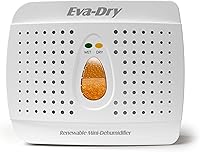
A cordless mini unit may be easier to place in a small space than a container that collects liquid, but it still needs careful positioning. The Eva-Dry Wireless Mini Dehumidifier uses silica gel beads and is designed to be recharged; it is described for small spaces such as closets, cabinets, and cars.
Keep it outside the computer case and where it cannot fall onto equipment. Check its instructions for use and recharging, and don't assume a mini absorber will control humidity across an entire room.
What should you do if the absorber spills?
Disconnect power only if you can do so safely without touching wet equipment or standing water. If liquid reaches a computer, outlet, or power strip, don't touch the wet area; get qualified help before using the equipment again.
If the spill stays well away from electronics, contain and clean it according to the absorber's directions. Dry the surface fully before placing anything back there, and move the absorber to a more secure location.
Don't use a hair dryer or other heat source to dry wet electronics. A hair dryer is for styling hair, not for drying a computer or its power connections.
For the difference between hair dryers and room moisture control, see air dryers vs dehumidifiers.
Can a room dehumidifier harm a computer?
A dehumidifier can be useful in a persistently damp room, but placement and moisture control still matter. Keep the unit level, use the drainage setup described in its manual, and avoid directing discharge or airflow at the computer.
Read can a dehumidifier damage a computer? for room-level precautions. If you're not sure whether you need a dehumidifier at all, do I really need a dehumidifier? can help you decide what problem you're trying to solve.
Which products fit this computer-side use?
For a computer-side moisture problem, focus on safe placement and the size of the damp area. A small cordless absorber may suit a confined spot; hair styling tools do not reduce room humidity and should not be used to dry electronics.
The Eva-Dry Wireless Mini Dehumidifier is the only one of these products intended to absorb moisture. It is cordless and uses rechargeable silica gel beads.
Use either REVLON tool only for hair, following its instructions. If the computer area remains damp, measure the room humidity and address the source or choose a room dehumidifier that fits the space.
How do you decide where to put dehumidifier balls?
Place dehumidifier balls beside a computer only when a spill cannot reach the computer, cables, or outlet. Use a low, stable spot, keep the absorber outside the case, and inspect it as directed.
Choose a passive absorber for a small enclosed area. If the room itself stays damp, check humidity and the source of moisture, then consider room-level control.
Frequently asked questions
Can dehumidifier balls damage a computer?
They can create a risk if the container tips or collected liquid reaches the computer, its cables, or a power outlet. Put the absorber on a stable surface below and away from electronics, and check it as directed.
Keep loose beads and liquid out of the computer case.
How far should a moisture absorber be from a computer?
There is no universal safe distance because containers and desk layouts differ. Place it where it cannot fall or spill toward the computer, keyboard, cables, or outlet, and avoid shelves directly above equipment.
A tray can add spill protection but does not make an unstable location safe.
Do dehumidifier balls protect a computer from humidity?
A passive absorber may collect some moisture in a small, enclosed area, but it does not control the humidity of an entire room like a powered dehumidifier. Check room humidity with a meter and address leaks, condensation, or poor ventilation if dampness continues.
Can I put dehumidifier balls inside a PC?
No. Keep moisture absorbers and loose beads outside the computer case, where they cannot obstruct airflow, shed material, or leak onto components.
If you want to reduce dampness around a computer, place a suitable absorber nearby with spill precautions and monitor the room's humidity.